
Yes. You can use Codex without ChatGPT Plus.
OpenAI includes Codex on the ChatGPT Free plan for quick tasks in the desktop app. GPT-6 Luna on that plan is subject to rollout. Go is $8 a month. Plus is $20 a month and adds the CLI, the IDE extension, iOS, and cloud tasks such as GitHub code review and Slack. There is no separate Codex subscription.
An API key works with no ChatGPT plan. It signs you into the CLI, the SDK, or the IDE extension, and OpenAI bills the tokens on your Platform account. Cloud tasks stay on ChatGPT sign-in. The steps below are the API-key trial I ran in November 2025.
I’ve been a happy Cursor user for a couple of months now. I love their recent updates, and everything is evolving in a direction that helps me get more done with AI-assisted coding.
But people are constantly sharing their amazing experiences with Codex and Claude Code, the two recent competitors in the AI coding world.
The problem?
Until now, I haven’t found a way to try any of these tools without subscribing to their monthly plan. Yes, you get a lot for $20, but I already have all those capabilities through Grok.
Then just yesterday, I thought, let’s install the Codex plugin in VSCode and see what I can do with it without the subscription. When I opened the Extension, it offered me to enter my API key or sign in with my ChatGPT account.
Since I’ve built some apps on top of OpenAI’s API, I knew I could top up my account with only $5, give the key to the extension, and give it a shot.
So I topped up $5, grabbed my API key, and opened VSCode.
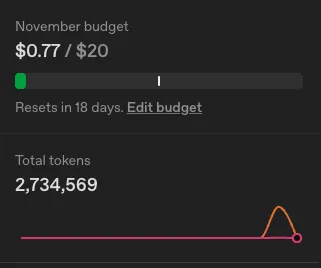
Two chat rounds later: feature shipped.
Dashboard: $0.77 spent, 2.73M tokens, one clean spike.
If you are unsure whether to go with Codex or not, I suggest you do the same experiment.
Why spend $5 to try Codex
-
No recurring fee: One-time $5 → full API access (can’t send tasks to Cloud, but I don’t know what that is yet)
-
Models: GPT-5, GPT-5-Codex
-
VSCode native: Official OpenAI extension → chat, file-aware, reads your codebase.
-
Perfect for testing: Try before you buy Plus, Claude Code, Cursor, or Windsurf.
Step-by-Step: Try Codex in 5 Minutes
-
Go straight to https://platform.openai.com/ and log in with your ChatGPT account.
-
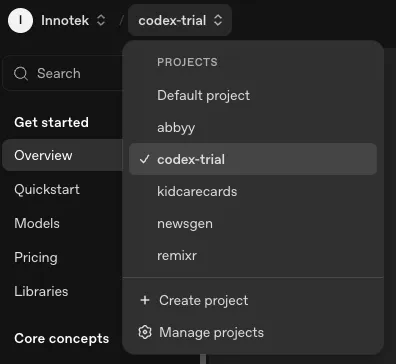
Create a separate project for this so it doesn’t interfere with other spending.
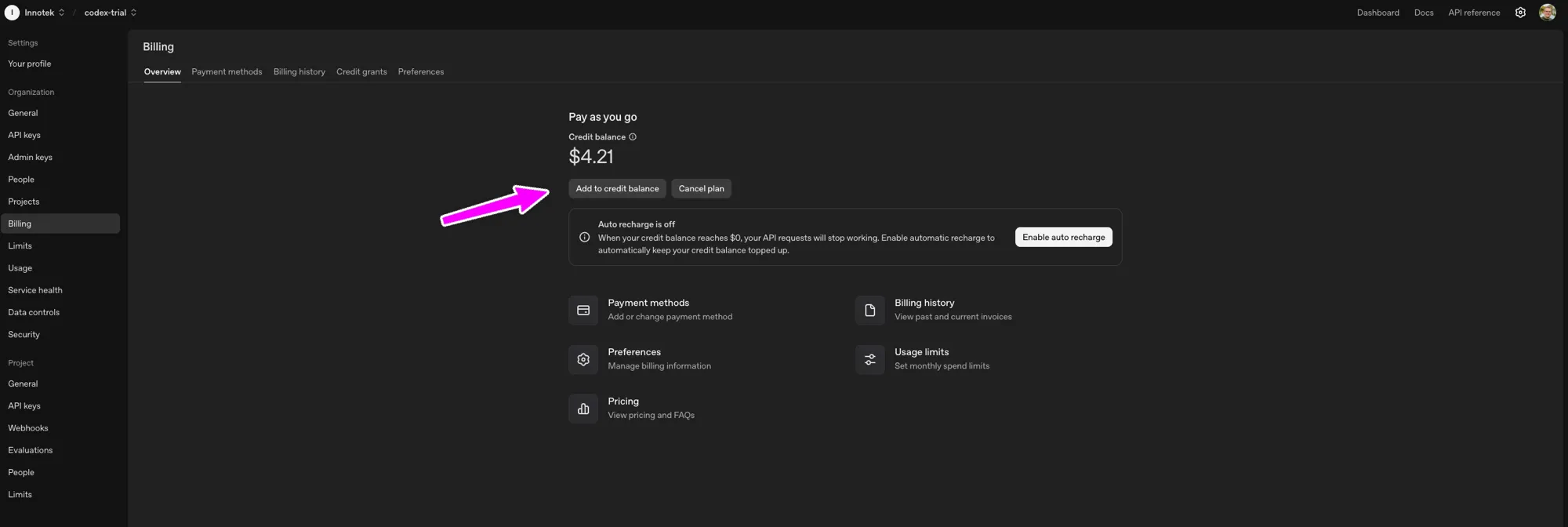
- In the sidebar, select Billing, which is where you can top up your balance
-
Now go to https://platform.openai.com/settings/organization/api-keys and generate a key
-
Install OpenAI VSCode extension Marketplace → search “Codex” (publisher: OpenAI) → install.
-
Sign in Command Palette (Cmd+Shift+P) → codex → Open Codex Sidebar → paste key.
-
Start coding
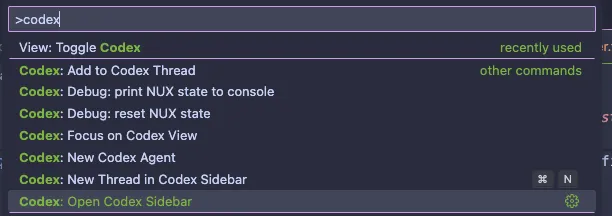
You’re live. No Plus. No proxy. Full Codex in your editor.
Real Production Test: Dropdown → Cleanup Job
Task I wanted to get done in a live app:
-
Add dropdown: “Archive old analytics”
-
POST /api/archive-old → delete rows >90 days old
-
Return { deleted: count }
-
Show toast
-
Add an integration test
Prompt (copy-paste):
As Superuser, I want to have the ability to exclude Analytics from billing. The exclude from study button should be placed inside the dropdown where we also have Archive and Delete Analytics.
Create the necessary endpoint for this that marks the appropriate analyticsItems as excludedFromBilling.
Round 1:
-
Backend: Perfect. Naming, types, SQL, error handling.
-
Integration test: Auto-detected bun test. I didn’t specify the framework — it read the repo.
-
Frontend: Missing entirely.
I asked:
hmm, do you know what is missing based on the spec I gave you?
Codex:
Right now only the backend half is done…
…Want me to take care of the frontend piece next?
Round 2 (Frontend):
-
Perfect: Correct component, translation key, toast, loading state.
-
Followed exact patterns from SettingsMenu.tsx.
Summary
Total: 2 rounds, shipped, deployed. Cost: $0.77 (2,734,569 tokens).
| Metric | Value |
|---|---|
| November spend | $0.77 / $20 |
| Total tokens | 2,734,569 |
| Spike pattern | One clean peak |
Conclusion
You don’t need ChatGPT Plus to try Codex. A $5 top-up + VSCode extension gives you full AI coding power — in your real codebase, with your patterns, for pennies.
Is this sustainable?
Of course not, since I’d be likely shipping 5 features for $5, where my $20/mo Cursor subscription can last all month while shipping daily.
But if this saved you $20, share it with others and tag me @akoskm on 𝕏.
FAQ
Can you use Codex without ChatGPT Plus?
Yes. The ChatGPT Free plan includes Codex for quick tasks in the desktop app, and GPT-6 Luna on that plan is subject to rollout. Go is $8 a month. Plus is $20 a month and adds the CLI, the IDE extension, iOS, and cloud tasks. An API key works with no ChatGPT plan.
Can you use Codex without a subscription?
Yes, with an API key. OpenAI bills the tokens on your Platform account at API rates. The CLI, the SDK, and the IDE extension accept the key. Codex cloud, GitHub code review, and Slack need a ChatGPT sign-in.
Is there a Codex subscription?
No. As of October 2026, OpenAI includes Codex with ChatGPT Free, Go, Plus, Pro, Business, Edu, and Enterprise. Plus is $20 a month. Pro is $100, $200, or $500 a month.
How do you buy Codex?
Buy a ChatGPT plan, or add credit on the OpenAI Platform and sign in with an API key. There is no separate Codex product to purchase. Plans are listed at https://developers.openai.com/codex/pricing/.